
Yes. A course always goes into the account for the email used at checkout, so check out with the learner's email address, not yours. For a team, each person needs their own account and their own order.
Buying for one person
Log out of your own OBA account if you're logged in. If checkout says Signed in as with your email, press Not you? Log out.
Press Enrol now on the course they want.
Type their email address under Your account (2).
Choose a password for them (3). You can pass it on, or they can set their own later with Forgotten your password? on the login page.
Fill in Billing details and Payment with your own name, address and card, then press Enrol now.
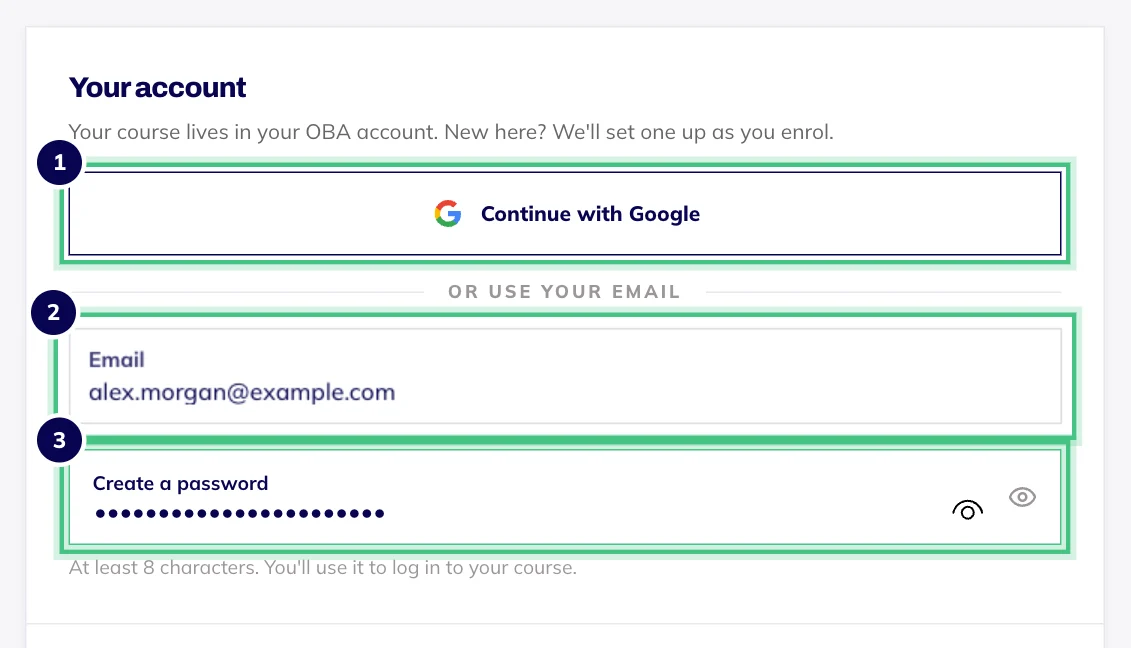
- Number 1: Continue with Google instead of typing anything.
- Number 2: Your email address.
- Number 3: New to OBA? Choose a password here and your account is ready the moment you pay.
There are no gift vouchers: the course goes straight into their account. Their receipt goes to their email, so ask them to forward it if you need a copy.
Three things to do afterwards
Log out on your device, from the menu under the initials at the top right. Checkout signs the buyer straight in, so you'll be logged in to their new account.
Ask them to check the name on their certificates. A new account starts with the name from Billing details, which is yours, so they should change it in Account settings, on the Profile tab, before they finish the course.
Tell them how to log in: their email, and the password you chose or one they set themselves.
If they already have an OBA account
Checkout will ask for their password before it adds a course to an existing account, so you can't buy into it as a guest. The simplest way is for them to log in and enrol themselves.
Buying for a team
There are no team accounts or bulk licences. Each learner needs their own OBA account, because the progress and the certificate are personal to them, and our terms ask for one account per person.
For a few people, put each one through checkout with their own email, one order each. For a larger group, or if your company needs particular paperwork, email hello@oba.uk or call 0800 060 8823 before you buy and we can talk it through.
Is your employer paying you back? Then buy it yourself with your own email. Your receipt shows what you paid and when, and you'll find it again under Purchases in Account settings.