
Log in before you press Enrol now, or simply type your email at checkout: we'll spot your account and ask you to log in right there. Either way, the course goes into the account you already use.
If you're already logged in
Checkout shows Signed in as with your email, and you go straight to billing and payment. Wrong account? Press Not you? Log out and you come back to the same checkout, with the same course, ready to use a different email.
If you already own everything you're about to buy, checkout says This is already in your account and offers Go to your course instead of a payment form.
Logging in at checkout
Type your email under Your account (2). If we know it, one of these appears in place of the Create a password box (3):
Welcome back: type your password and press Log in. The page refreshes as yours, with the same course still in the order. If your account also uses Google, Or log in with Google is there too.
This email signs in with Google: press Continue with Google and you come straight back to finish enrolling.
You've enrolled with us before: you bought from us without ever choosing a password. Press Email me a link, then open the email on the same device and set your password. You'll land back on the checkout, logged in.
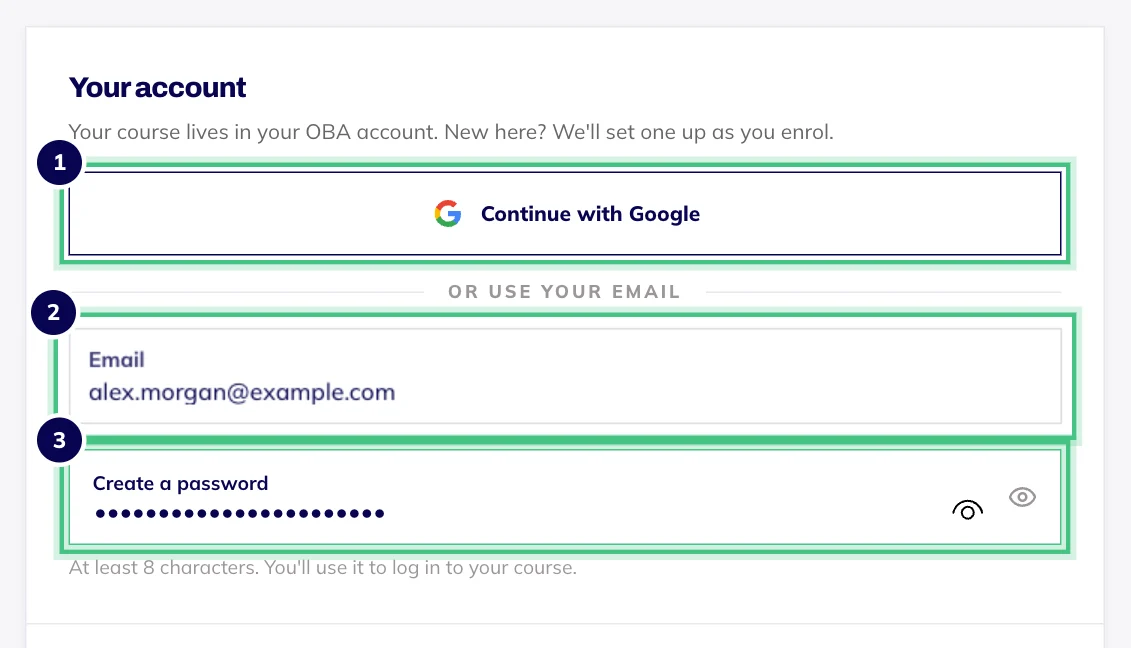
- Number 1: Continue with Google instead of typing anything.
- Number 2: Your email address.
- Number 3: New to OBA? Choose a password here and your account is ready the moment you pay.
Enrol now stays switched off until you've logged in. That's on purpose: it makes sure the course goes into the account you already have, not a new one.
If something gets in the way
Forgotten your password? Press Forgotten your password? in the Welcome back box. We'll email you a link, and if you open it on the same device you'll land back on the checkout, logged in.
Told your email address hasn't been confirmed? Use the link we sent when you signed up, or reset your password from the Welcome back box.
Told there have been too many tries? Give it a minute and have another go.
Used a different email last time? Courses stay in the account they were bought in, so use the email you signed up with. If you've ended up with two accounts, email hello@oba.uk and we'll help.
Logging in never adds anything to your order. Checkout only ever holds the course you just chose.