
You can pay by debit or credit card, or with Apple Pay, Google Pay or Link where your device offers them. If a payment is declined, nothing is charged and your details stay on the page, so you can fix it and press Enrol now again.
Ways to pay
The Payment section (3) shows every option your device supports. Most people use a card. Apple Pay and Google Pay appear when your phone or browser is set up for them, and Link fills in a card you've saved with Link before, after a quick code.
Save my information for faster checkout saves your details with Link, not with us, and is up to you. Your card details go straight to Stripe, our payment provider, and never touch our systems.
Prices are in pounds and you pay once: nothing renews. If you can't pay by card or with a wallet, email hello@oba.uk before you buy.
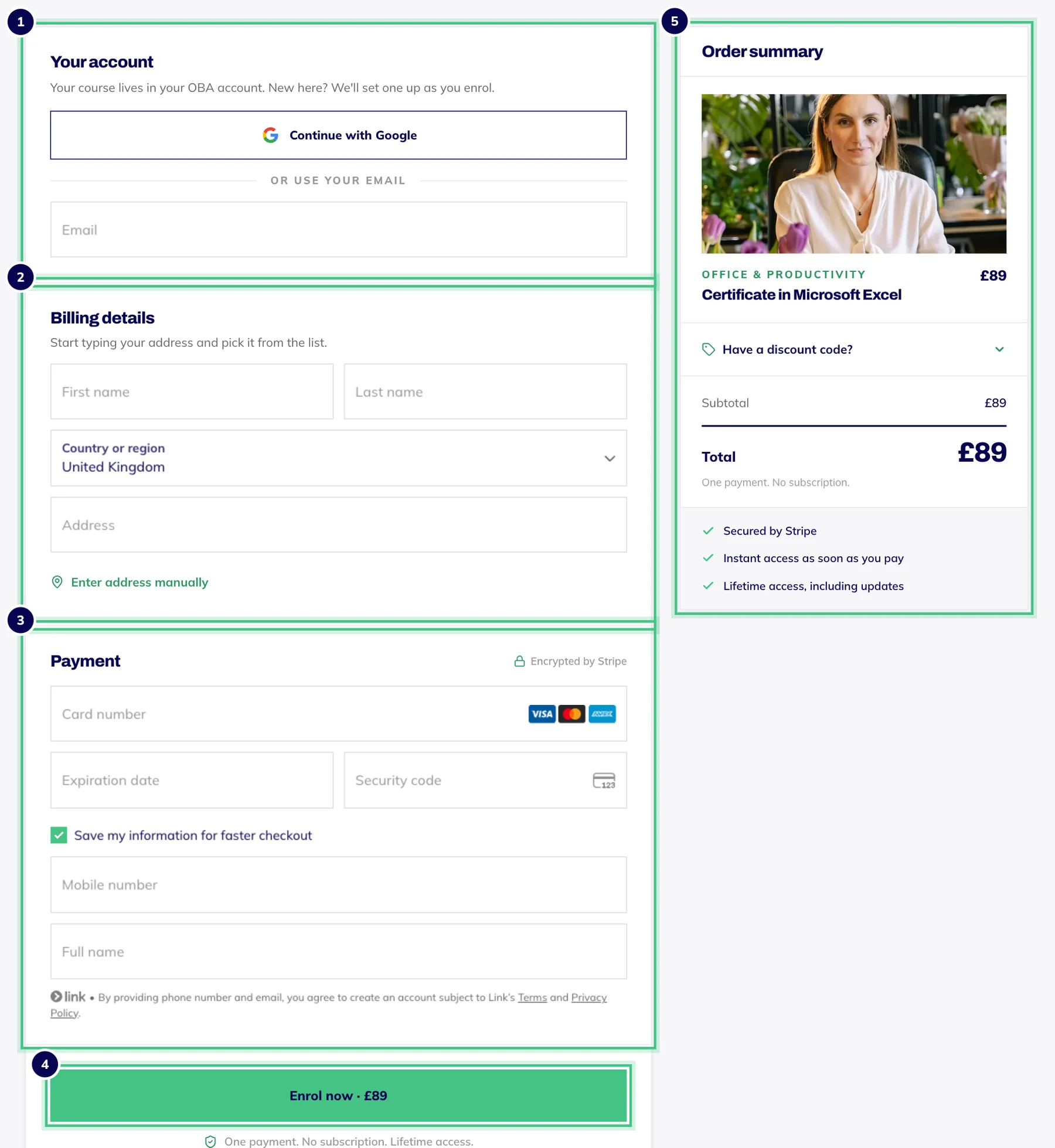
- Number 1: Your account: continue with Google, or type your email.
- Number 2: Billing details: start typing your address, or enter it by hand.
- Number 3: Payment: card, or Apple Pay, Google Pay or Link where your device offers them.
- Number 4: Enrol now pays and opens your course straight away.
- Number 5: The order summary, with the box for a discount code.
Confirming it's you
Your bank may ask you to approve the payment, usually in your banking app or with a code. A box opens over the checkout for it, and you stay on our page.
If the approval doesn't go through, you'll see Verification didn't complete. Press Enrol now again and approve the request this time.
If your card is declined
You'll see Your card was declined above the form. Nothing has been charged and your details are still there. Only your bank can say exactly why, but one of these usually sorts it:
Check the card number, expiry date and security code.
Make sure the postcode in Billing details matches the address your bank has for the card.
Approve the payment if your banking app asks, or check with your bank that online payments are switched on for the card.
Try another card, or Apple Pay, Google Pay or Link.
Trying again won't create a second order. You're only charged once, when a payment goes through.
Other messages
That payment did not go through: nothing has been charged. Check the message beside it, then try again.
Confirming your enrolment or Setting up your account, on the button: keep the page open. It usually takes a few seconds.
This is taking longer than usual, on the confirmation page: your payment went through and nothing is wrong with it. Email hello@oba.uk or call 0800 060 8823 with the order number shown and we'll sort out your enrolment.