
Both are at the bottom of the Profile tab in Account settings. Download my data saves a file straight away, and Delete my account schedules your account for deletion, with 30 days to change your mind.
Download your data
Download my data gives you a JSON file with your profile, purchases, progress, notes and certificates. It downloads straight away, with no waiting and no email. Course content isn't included, because that's ours rather than yours.
Select your initials at the top right of the app and choose Account settings (1).
On the Profile tab, scroll down to Danger zone.
Under Download everything we hold, press Download my data.
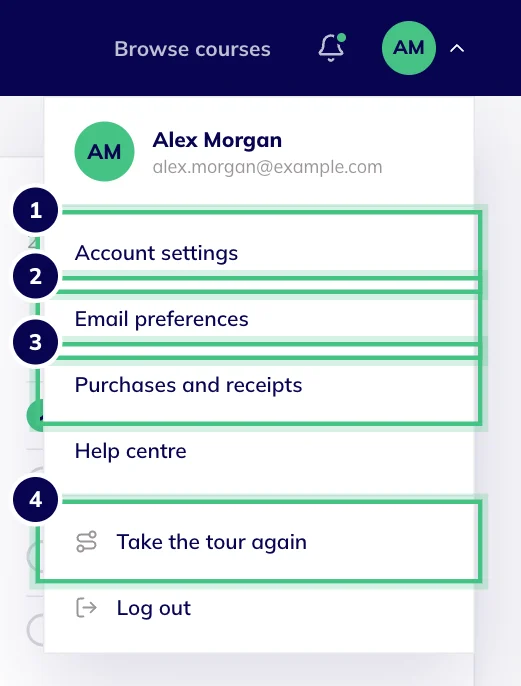
- Number 1: Account settings: your name, email, password and more.
- Number 2: Email preferences.
- Number 3: Purchases, with your receipts.
- Number 4: Take the tour again any time.
Want something the file does not cover? Email hello@oba.uk. We confirm within 1 working day and respond in full within one month.
Delete your account
In the same Danger zone, press Delete my account.
Type DELETE, in capitals, in the box. The button won't respond until you do.
Press Delete my account again to confirm.
Once you confirm, you're logged out on every device straight away, and your account is scheduled for deletion 30 days later.
What deletion removes, and what it keeps
It removes your progress, your notes and your certificates, including the credential IDs employers use to verify them.
Order and payment records stay for as long as tax and accounting law requires, even after your account has gone.
You can delete your CVs, interview sessions and recordings in the Career Centre yourself at any time, without deleting your account.
Download your certificates first. Once your account is deleted, employers can no longer check them.
Changed your mind?
Log in again any time before the deletion date.
Go to Account settings. The Profile tab shows the date your account is due to be deleted.
Press Keep my account. Nothing has been removed, so everything is just as you left it.